Commercial invoice
Customer and seller details, item lines, weights, agreed pricing, charges, totals and bank information give the recipient a structured record of the transaction.
Commercial invoice, packing list, amount in words, bank block — all from one wizard. Pick the customer, add the lines, lock the rate; AurumIQ computes every figure the way customs and auditors expect, signs the documents and prints them.
Everything a counter needs to ship a parcel, in the order it happens.
Choose the consignee from your KYC-checked customer list; passport, importer code and address flow onto the documents. Set incoterm, currency, payment mode and the bank account to print.
Fetch the live USD/oz rate or type the agreed fix. Add product lines with pieces, gross and net weight, karat and making charge; the per-gram price and line total update as you type.
Rebate, freight, insurance and VAT are applied in a fixed, auditable order. The total is written out in words and reconciled to the packing list to the gram before you can issue.
Issuing assigns the invoice number, signs the QR payload, allocates piece serials and prints the invoice, packing list and labels. Void later with a reason; the QR then verifies as CANCELLED.
USD per troy ounce to per-gram, purity factor for 24K/22K/21K/18K, making charge per gram, net weight — with the rounding order fixed so the same inputs always give the same total.
A4 layout with seller and consignee blocks, HS codes, one line per product, gross/net weights, rate applied, charges, VAT treatment and the signed QR in the corner.
Per-package contents, serial ranges, gross weight and dimensions. Totals reconcile automatically to the invoice; a mismatch blocks issue instead of surprising customs.
The total is spelled out in the invoice currency (USD or AED) exactly as banks and customs expect — no manual typing, no transposed digits.
Keep several settlement accounts on file; pick one per invoice and the beneficiary, IBAN, SWIFT and branch print in the bank block, matched to the invoice currency.
Percentage rebate from the buyer's loyalty tier, freight and insurance amounts, and the applicable VAT rate or zero-rated export statement, each shown on its own line.
Lines draw serials from completed work orders (FIFO) and print 50×22 mm labels with a signed QR, so every bangle can be checked back to its invoice line.
Invoice number, date, consignee, pieces, weight and amount are signed with your organisation's secret. A scan on the public portal answers VALID, CANCELLED or TAMPERED.
Void an issued invoice with a reason, reprint any document, and see every action in a hash-chained ledger that makes edits to history visible.
Yes. Each invoice has a currency; the rate, totals, amount in words and the bank block follow it. The exchange rate used is printed for VAT records.
The rate is locked into the invoice and signed into its QR payload. The document verifies against the rate it was issued at, whatever the market does afterwards.
No. Issuing, signing and printing run entirely on the workstation. The invoice summary syncs to the verification portal when you are back online; until then a scan shows “verified offline”.
Issued invoices are immutable. Void it with a reason and issue a corrected one; the old QR then verifies as CANCELLED so the wrong copy cannot be reused.
Invoice and packing list print to any A4 printer or PDF. Piece labels use 50×22 mm rolls on common thermal label printers.
The issued invoice brings the customer, agreed pricing, product quantities and settlement details together. Its signed reference connects the printed document to the public verification portal.
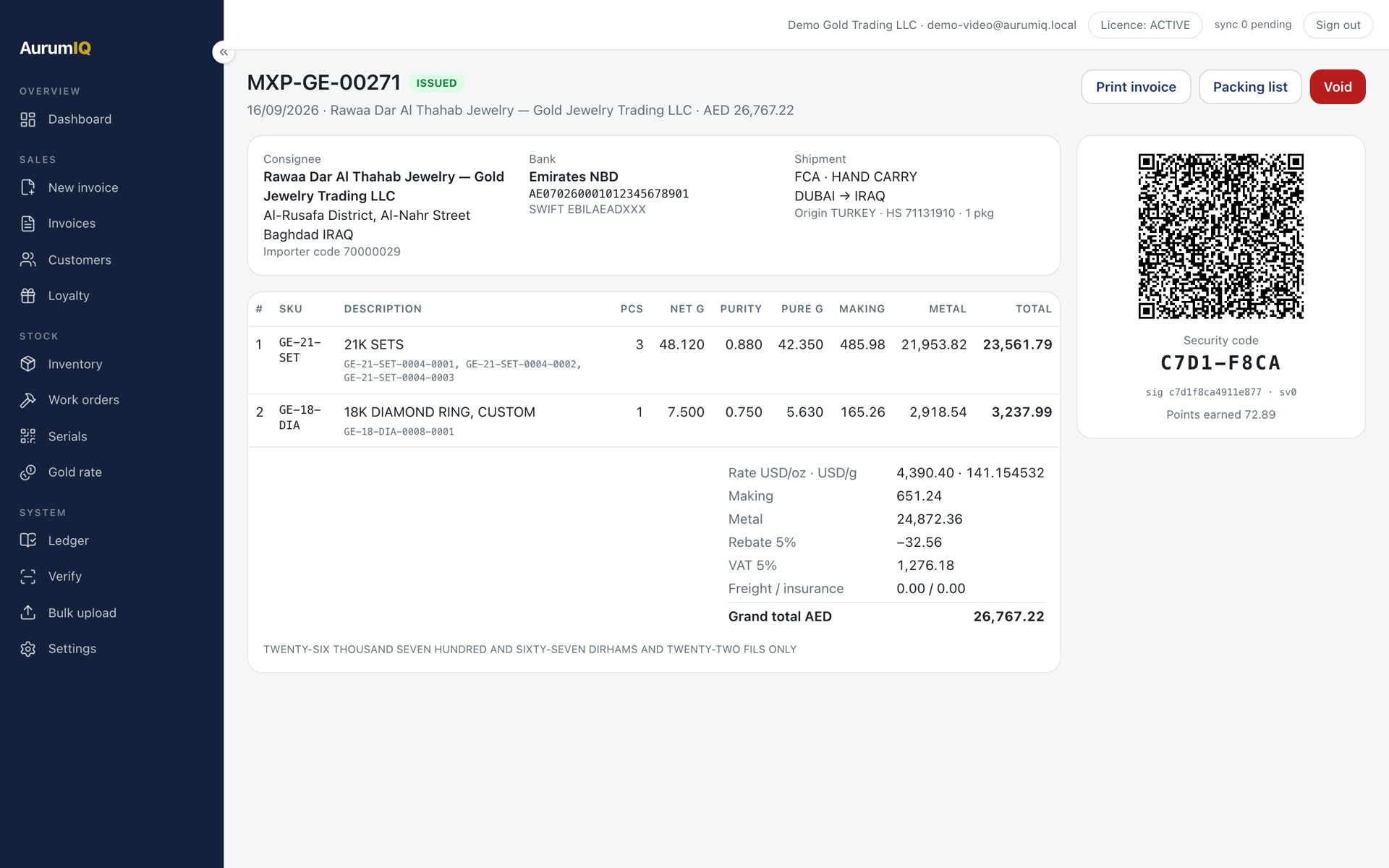
Customer and seller details, item lines, weights, agreed pricing, charges, totals and bank information give the recipient a structured record of the transaction.
Use the accompanying packing list to review the shipment’s contents alongside the invoice. Keep the issued documents together when handing over the consignment.
For serialised products, available pieces are allocated to the invoice. Individual labels provide a reference for looking up each piece through its own verification flow.
If an issued invoice needs correction, void it with a reason and issue a replacement. The void action is recorded in the audit trail and queued for sync. Once the portal receives the update, the old invoice returns a CANCELLED result.
Understand verification resultsThe desktop app can issue, sign and print offline. Fetching a fresh market rate and syncing with the hosted verification portal need connectivity. Confirm the rate you intend to use before issue.
Activate the workstation and review your company identity, invoice numbering, currencies and bank accounts.
Add or import customer and product records. For serialised items, create the stock you intend to allocate.
Review a sample invoice and your print setup with the team. Check the recipient’s verification journey before starting daily operations.
Install on the workstation, activate the licence, import your customers and products, and ship.